- ViFerm
- Cattle records
Cattle records, kept on the phone
Every animal has a record of its own, holding everything written down about it from the day it entered the farm to the day it left.
What an animal record holds
The record is where everything comes together. There is no separate register for ear tags, another for treatments and a third for weighings: every note made on the farm lands on the record of the animal it concerns.
- Identification: the official ear tag, the second ear tag, the RFID chip and an internal farm code, if you use one.
- Characteristics: breed, sex, colour, distinguishing marks.
- Calendar dates: the date of birth and the date of entry into the farm, which are not the same day for a bought-in animal.
- Connections: dam, sire and offspring, with a direct jump to each one's record.
- The history: heats, matings, pregnancies, calvings, treatments, vaccinations, weighings, milk yield.
From entry into the farm to exit
An animal that leaves the farm is not deleted. A sale, a death or a slaughter is written down as an event, with its date and circumstances, and the record stays whole and readable. Deleting is a separate act, asked for on purpose — and before it happens we spell out what goes with the animal.
That matters at two moments: when you go looking for what became of an animal sold two years ago, and when you want to see what a maternal line has produced over time, including through offspring no longer in the herd.
A sale entered by mistake can be reversed. The line stays, struck through, with the time and the reason; the animal returns to the herd, and the money drops out of every total — nothing is quietly deleted.
The herd, however large
The animal list filters as you type, by ear tag or name, and narrows down by production class: cows, heifers, young stock, calves. Import and speed were tested on a herd of 1,602 animals, with full pedigree and history.
The list of animals, ready to print
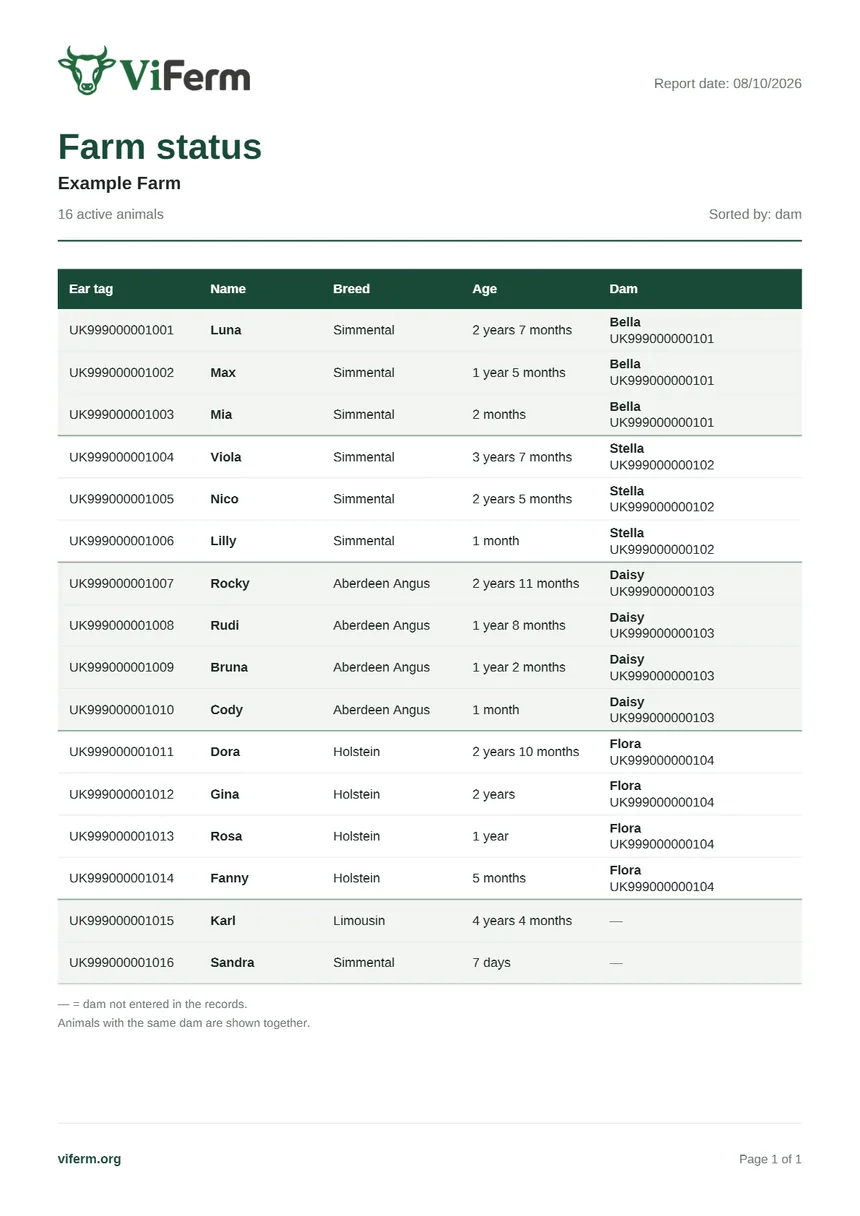
You prepare a PDF with each animal's ear tag, name, breed, age and dam. You choose the whole active herd or the filtered list, and group the animals by dam or sort them by ear tag. A list that is easy to take to the barn, use for a stock check or go through with the vet.
You do not retype what you already have
If you already keep your animals in an Excel or CSV file, you can use it to upload your herd into ViFerm. Before saving, you see how the information is taken in and can check it. That way you start from the data you already have and type in fewer animals by hand.
You can download a full copy of your farm: one file with all the data and a separate archive with the photos and documents. That way you also keep your own copy of your information from ViFerm.
Start with the herd you already have.
Import your animals from a spreadsheet or add them one by one. The account is free and needs no subscription.